

In the ever - evolving landscape of computer hardware, the performance of multi - core CPUs has reached unprecedented heights. These powerhouses are capable of handling complex tasks such as high - end gaming, video editing, and scientific simulations. However, with great power comes great heat, and effective cooling solutions are essential to ensure the longevity and optimal performance of these processors. As a supplier of Intel AIO (All - In - One) coolers, I am often asked: Does the Intel AIO cooler work well with multi - core CPUs? In this blog, I will delve into the details to provide a comprehensive answer.
The Heat Challenge of Multi - Core CPUs
Multi - core CPUs are designed with multiple processing cores working in parallel. This architecture allows for significantly increased processing power, but it also generates a large amount of heat. Each core, when under heavy load, dissipates energy in the form of heat. As the number of cores increases, so does the total heat output.
For example, modern high - end multi - core CPUs can have up to 64 cores or more in some server - grade processors. During tasks like rendering a 3D animation or running a virtual machine, these processors can reach extremely high temperatures. If not properly cooled, the CPU will throttle its performance to prevent overheating, which leads to slower processing speeds and a less than optimal user experience.
How Intel AIO Coolers Work
Intel AIO coolers are a type of liquid cooling solution. They consist of a water block, a radiator, a pump, and fans. The water block is placed directly on top of the CPU. It contains a cold plate that comes into contact with the CPU's heat spreader. Inside the water block, coolant (usually a mixture of water and additives) absorbs the heat from the CPU.
The pump then circulates the heated coolant through a series of tubes to the radiator. The radiator is a large heat exchanger with a series of fins. The fans attached to the radiator blow air over these fins, transferring the heat from the coolant to the surrounding air. The cooled coolant then returns to the water block to repeat the cycle.
Advantages of Intel AIO Coolers for Multi - Core CPUs
Efficient Heat Dissipation
One of the primary advantages of Intel AIO coolers for multi - core CPUs is their superior heat dissipation capabilities. Liquid cooling is generally more efficient than air cooling because water has a higher specific heat capacity than air. This means that water can absorb more heat per unit mass than air. As a result, Intel AIO coolers can transfer heat away from the CPU more quickly and effectively, keeping the CPU temperatures lower even under heavy loads.
For instance, in a benchmark test of a high - end multi - core CPU running a demanding gaming application, an Intel AIO cooler was able to maintain the CPU temperature at least 10 - 15 degrees Celsius lower than a comparable air cooler. This lower temperature allows the CPU to operate at its full potential without throttling.
Quiet Operation
Multi - core CPUs often require powerful cooling solutions, and traditional air coolers may need large fans running at high speeds to dissipate the heat. These high - speed fans can generate a significant amount of noise, which can be a nuisance, especially in a home or office environment.
Intel AIO coolers, on the other hand, can operate more quietly. The pump and fans in an AIO cooler can be optimized to run at lower speeds while still providing sufficient cooling. The liquid coolant also helps to dampen some of the vibrations and noise that would otherwise be produced by the cooling system.
Space - Saving Design
Another benefit of Intel AIO coolers is their compact design. Multi - core CPUs are often used in high - performance desktops, and space inside the computer case can be limited. Traditional air coolers can be large and bulky, taking up a significant amount of space in the case. This can make it difficult to install other components or can restrict airflow around the case.
Intel AIO coolers, with their smaller water blocks and flexible tubing, are more space - efficient. They can be installed in a wider range of computer cases, including smaller form - factor cases, without sacrificing cooling performance.
Compatibility and Installation
Intel AIO coolers are designed to be compatible with a wide range of Intel multi - core CPUs. They come with mounting brackets and hardware that are specifically designed to fit different CPU socket types. This makes the installation process relatively straightforward, even for users with limited technical knowledge.
However, it is important to ensure that the AIO cooler you choose is compatible with your specific CPU model and motherboard. Before purchasing an Intel AIO cooler, it is recommended to check the product specifications and compatibility list provided by the manufacturer.
Comparing with Other Cooling Solutions
Air Coolers
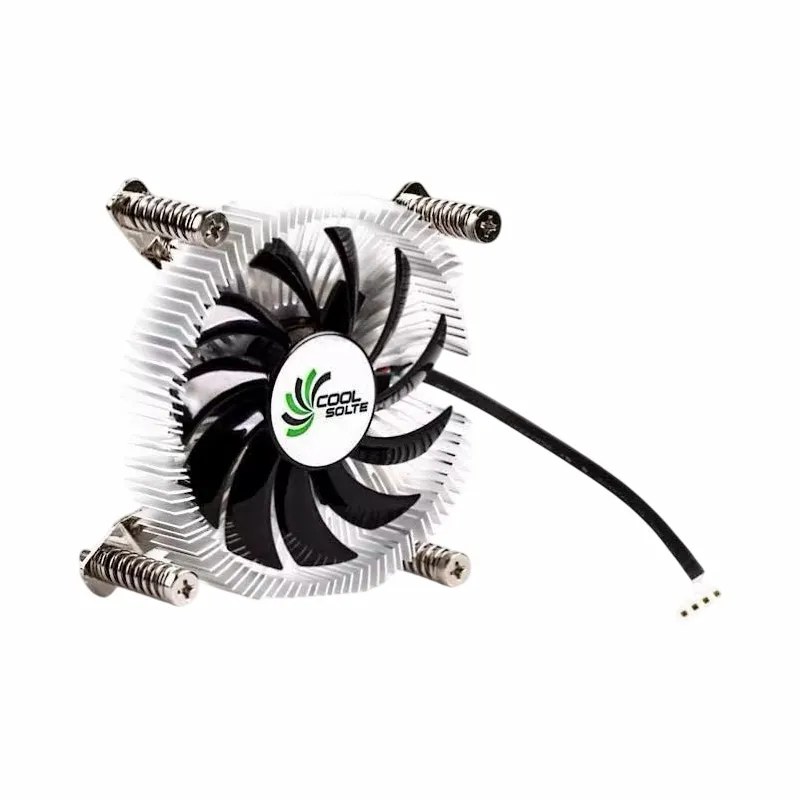
Air coolers, such as the Air Cooler Fans Cooling Heat Sink for CPU, are a more traditional and cost - effective cooling solution. They rely on a large heat sink and fans to dissipate heat from the CPU. While air coolers can be effective for lower - end or moderately - loaded multi - core CPUs, they may struggle to keep up with the heat output of high - end multi - core processors.
Air coolers also tend to be larger and heavier than Intel AIO coolers. This can put additional stress on the CPU socket and motherboard, especially in cases where the cooler needs to be installed in a vertical orientation.
Heatpipe Radiators
Heatpipe radiators, like the Copper CPU Heatpipe Radiator for AMD Intel, are another type of cooling solution. They use heat pipes filled with a working fluid to transfer heat from the CPU to the radiator. Heatpipe radiators offer better heat transfer capabilities than traditional air coolers but are still generally less efficient than liquid cooling solutions like Intel AIO coolers.
Heatpipe radiators can also be more complex to install, especially in cases where multiple heat pipes need to be routed around other components in the computer case.

Real - World Performance
In real - world usage scenarios, Intel AIO coolers have proven to be effective at cooling multi - core CPUs. For example, in a professional video editing setup, a multi - core CPU is constantly under heavy load as it processes high - resolution video files. An Intel AIO cooler can maintain the CPU temperature at a stable level, allowing the video editing software to run smoothly without any performance degradation.
In the gaming community, multi - core CPUs are essential for running the latest games at high frame rates. Intel AIO coolers ensure that the CPU can handle the intense processing demands of modern games without overheating, providing a seamless gaming experience.
Conclusion
In conclusion, Intel AIO coolers work very well with multi - core CPUs. They offer efficient heat dissipation, quiet operation, and a space - saving design. Compared to other cooling solutions such as air coolers and heatpipe radiators, Intel AIO coolers are better equipped to handle the high heat output of modern multi - core processors.
If you are in the market for a reliable cooling solution for your multi - core CPU, I highly recommend considering an Intel AIO cooler. As a supplier of Intel AIO coolers, we offer a wide range of products to meet your specific needs. Whether you are a gamer, a content creator, or a professional in need of high - performance computing, our Intel AIO coolers can provide the cooling performance you require.
If you are interested in purchasing our Intel AIO coolers or have any questions about our products, please feel free to contact us for a procurement negotiation. We look forward to working with you to find the best cooling solution for your multi - core CPU.
References
- "CPU Cooling: A Comprehensive Guide" - PC Magazine
- "The Science of Liquid Cooling" - AnandTech
- "Multi - Core CPU Performance and Cooling" - Tom's Hardware