

As a trusted supplier of OPS CPU heat sinks, I've encountered numerous inquiries from customers regarding the potential risks associated with these cooling components. One of the most common questions I'm asked is, "Can a heavy OPS CPU heat sink damage my motherboard?" This blog post aims to provide a comprehensive answer to this question based on scientific knowledge and practical experience.
Understanding the Basics of OPS CPU Heat Sinks
Before diving into the potential risks, it's essential to understand the role of an OPS CPU heat sink. OPS (Open Pluggable Specification) is a standardized form factor for computer modules commonly used in digital signage, kiosks, and other embedded systems. The CPU in these systems generates a significant amount of heat during operation, and a heat sink is essential to dissipate this heat and prevent the CPU from overheating.
Heat sinks work by absorbing heat from the CPU and transferring it to the surrounding air. They typically consist of a metal base that makes contact with the CPU and a series of fins or pins that increase the surface area for heat dissipation. Some heat sinks also incorporate fans or heat pipes to enhance cooling efficiency.
The Potential for Damage
The concern about heavy OPS CPU heat sinks damaging motherboards stems from the fact that the weight of the heat sink can put stress on the motherboard and its components. If the motherboard is not properly supported or if the heat sink is installed incorrectly, this stress can potentially lead to several issues:
1. Bending or Warping of the Motherboard
A heavy heat sink can cause the motherboard to bend or warp, especially if it is not evenly distributed across the CPU socket. This bending can damage the solder joints on the motherboard, leading to electrical failures or component malfunctions.
2. Loose or Damaged Socket Pins
The CPU socket on a motherboard contains a series of delicate pins that connect the CPU to the rest of the motherboard. If the heat sink is too heavy, it can put excessive pressure on these pins, causing them to bend or break. This can result in a poor connection between the CPU and the motherboard, leading to system instability or failure to boot.
3. Stress on Mounting Holes
Most motherboards have mounting holes for attaching the heat sink. If the heat sink is too heavy, the weight can put stress on these holes, causing them to crack or break. This can make it difficult or impossible to secure the heat sink properly, leading to poor cooling performance and potential damage to the CPU.
Factors Affecting the Risk of Damage
While a heavy OPS CPU heat sink can potentially damage a motherboard, the risk of damage depends on several factors:
1. Motherboard Design and Quality
The design and quality of the motherboard play a significant role in determining its ability to withstand the weight of a heat sink. Motherboards with thicker PCB (printed circuit board) layers and better-reinforced mounting holes are generally more resistant to bending and warping. Additionally, high-quality motherboards often have better support structures around the CPU socket to distribute the weight of the heat sink evenly.
2. Heat Sink Design and Installation
The design of the heat sink itself also affects the risk of damage. Heat sinks with a wider base and more evenly distributed weight are less likely to cause stress on the motherboard. Additionally, proper installation of the heat sink is crucial to minimize the risk of damage. Make sure to follow the manufacturer's instructions carefully when installing the heat sink, and use the appropriate mounting hardware.
3. System Usage and Environment
The usage and environment of the system can also impact the risk of damage. If the system is subjected to frequent vibrations or shocks, the weight of the heat sink can exacerbate the stress on the motherboard. Additionally, high temperatures and humidity can also affect the performance and durability of the motherboard and its components.
Minimizing the Risk of Damage
To minimize the risk of damage from a heavy OPS CPU heat sink, consider the following tips:
1. Choose the Right Heat Sink
When selecting a heat sink for your OPS system, consider the weight and design of the heat sink in relation to the motherboard. Choose a heat sink that is specifically designed for your CPU and motherboard, and make sure it is compatible with the mounting holes and socket type. Additionally, look for heat sinks with a wider base and more evenly distributed weight to minimize the stress on the motherboard.
For example, our Air Cooler Fans Cooling Heat Sink for CPU is a lightweight and efficient cooling solution that is designed to fit most OPS systems. It features a compact design and a high-performance fan to provide excellent cooling performance without putting excessive stress on the motherboard.
2. Install the Heat Sink Properly
Proper installation of the heat sink is crucial to minimize the risk of damage. Make sure to clean the CPU and the base of the heat sink thoroughly before installing the heat sink, and apply a thin layer of thermal paste to ensure good heat transfer. Additionally, follow the manufacturer's instructions carefully when installing the heat sink, and use the appropriate mounting hardware.
3. Provide Adequate Support
To reduce the stress on the motherboard, make sure to provide adequate support for the heat sink. This can include using a backplate or a support bracket to distribute the weight of the heat sink evenly across the motherboard. Additionally, make sure the system is installed in a stable and vibration-free environment to minimize the risk of damage from vibrations or shocks.
4. Monitor the System Temperature
Regularly monitoring the system temperature can help you detect any potential issues with the heat sink or the cooling system. If the system temperature is consistently higher than normal, it may indicate a problem with the heat sink or the cooling system. In this case, you should immediately shut down the system and investigate the issue.
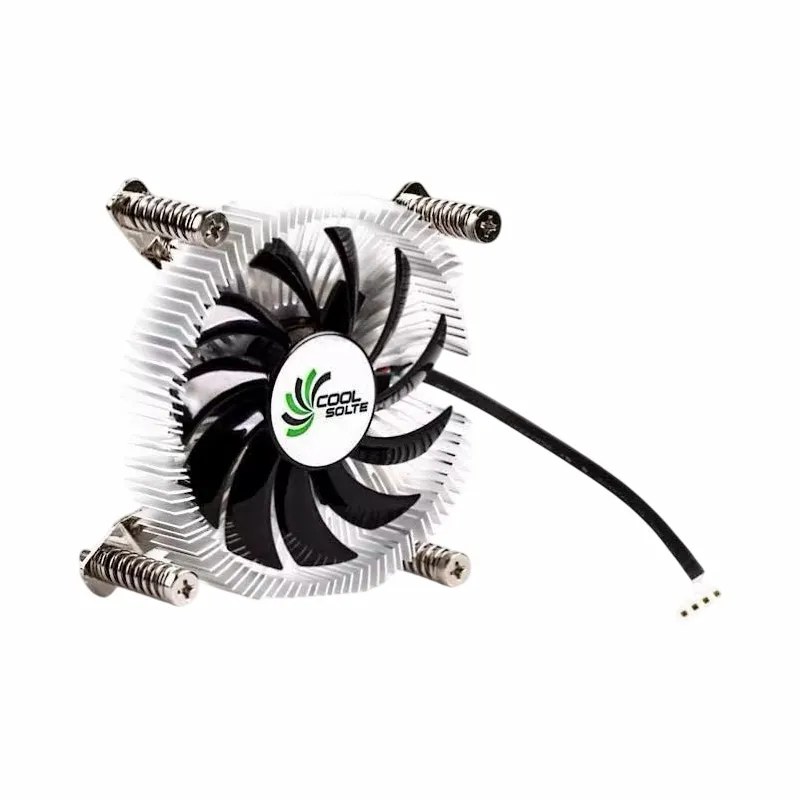

Our Range of OPS CPU Heat Sinks
As a leading supplier of OPS CPU heat sinks, we offer a wide range of high-quality cooling solutions to meet the needs of our customers. Our heat sinks are designed to provide excellent cooling performance, reliability, and durability, and are suitable for a variety of OPS systems.
In addition to the Air Cooler Fans Cooling Heat Sink for CPU, we also offer other popular products such as the Copper CPU Heatpipe Radiator for AMD Intel and the Computer Cooler Fan with Alloy Aluminium CPU Heat Sink. These products are designed to provide efficient cooling for high-performance CPUs, and are suitable for use in demanding applications such as gaming, video editing, and data processing.
Contact Us for Procurement
If you're interested in purchasing our OPS CPU heat sinks or have any questions about our products, please don't hesitate to contact us. Our team of experts is available to provide you with detailed information about our products and help you choose the right cooling solution for your needs. We look forward to working with you and helping you keep your OPS systems running cool and reliable.
References
- "Computer Hardware: A Beginner's Guide" by Andrew Tanenbaum
- "Thermal Management in Electronic Systems" by Avram Bar-Cohen and David A. Reay
- Manufacturer's documentation for OPS CPU heat sinks and motherboards