

In the world of computing, maintaining optimal CPU temperatures is crucial for both performance and longevity. As an aluminum CPU cooler supplier, I've witnessed firsthand the constant evolution of cooling technology and the demand for quiet yet efficient solutions. This blog aims to explore the existence of quiet aluminum CPU coolers, delving into the science behind their operation, the benefits they offer, and some of the top products on the market.
The Science of CPU Cooling
Before we dive into the topic of quiet aluminum CPU coolers, it's important to understand the basic principles of CPU cooling. When a CPU is in operation, it generates heat due to the electrical resistance within its components. If this heat is not dissipated effectively, it can lead to increased temperatures, which in turn can cause the CPU to throttle its performance to prevent damage. This throttling can result in slower processing speeds, reduced multitasking capabilities, and overall system instability.
CPU coolers work by transferring heat away from the CPU and into the surrounding environment. There are two main types of CPU coolers: air coolers and liquid coolers. Air coolers typically consist of a heatsink made of a thermally conductive material, such as aluminum or copper, and one or more fans to blow air over the heatsink. Liquid coolers, on the other hand, use a liquid coolant to transfer heat from the CPU to a radiator, where it is dissipated into the air.
Why Aluminum?
Aluminum is a popular choice for CPU heatsinks due to its excellent thermal conductivity, lightweight nature, and relatively low cost. Thermal conductivity is a measure of a material's ability to conduct heat, and aluminum has a thermal conductivity of around 205 W/mK, which is lower than copper (around 401 W/mK) but still sufficient for most CPU cooling applications.
In addition to its thermal properties, aluminum is also lightweight, which makes it easier to install and reduces the stress on the CPU socket. This is particularly important for high-performance CPUs that generate a lot of heat and require large, heavy heatsinks. Finally, aluminum is relatively inexpensive compared to other materials, such as copper, which makes it a cost-effective choice for CPU coolers.
The Quest for Quiet Cooling
One of the biggest challenges in CPU cooling is finding a balance between performance and noise. While high-performance fans can provide excellent cooling, they often generate a lot of noise, which can be distracting and annoying, especially in a quiet environment. This is where quiet aluminum CPU coolers come in.
Quiet aluminum CPU coolers are designed to provide effective cooling while minimizing noise levels. They typically use low-noise fans, advanced fan blade designs, and other noise-reducing technologies to achieve this. Some quiet aluminum CPU coolers also feature larger heatsinks with more surface area, which allows them to dissipate heat more efficiently without the need for high-speed fans.
Top Quiet Aluminum CPU Coolers
As an aluminum CPU cooler supplier, I've had the opportunity to work with a variety of products on the market. Here are some of the top quiet aluminum CPU coolers that I recommend:
-
Copper CPU Heatpipe Radiator for AMD Intel: This CPU cooler features a copper heatpipe radiator and an aluminum heatsink, which provides excellent thermal performance. The cooler also comes with a low-noise fan that operates at a maximum speed of 1,500 RPM, which helps to keep noise levels down.
-
Air Cooler Fans Cooling Heat Sink for CPU: This air cooler features a large aluminum heatsink and two low-noise fans that operate at a maximum speed of 1,800 RPM. The cooler also has a unique fan blade design that helps to reduce noise levels while providing excellent cooling performance.

-
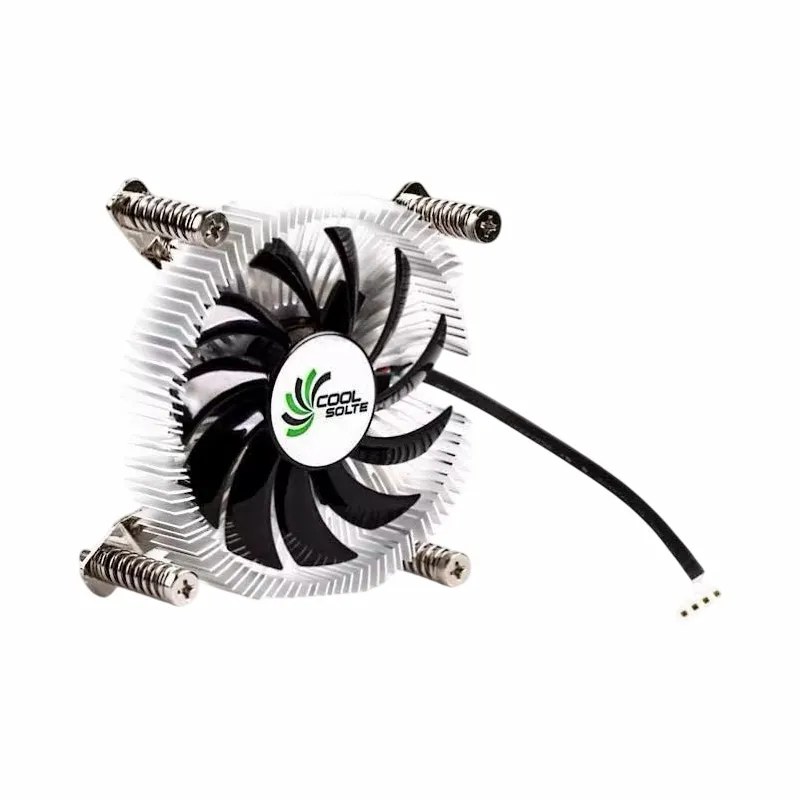
Computer Cooler Fan with Alloy Aluminium CPU Heat Sink: This cooler features an alloy aluminum heatsink and a low-noise fan that operates at a maximum speed of 1,200 RPM. The cooler also has a compact design, which makes it ideal for small form factor computers.
Benefits of Quiet Aluminum CPU Coolers
There are several benefits to using quiet aluminum CPU coolers, including:
-
Reduced Noise Levels: As the name suggests, quiet aluminum CPU coolers are designed to operate quietly, which can help to create a more comfortable and productive computing environment. This is particularly important for users who work in quiet offices or who use their computers for gaming or multimedia applications.
-
Improved Performance: By keeping CPU temperatures under control, quiet aluminum CPU coolers can help to improve system performance and stability. This is because high temperatures can cause the CPU to throttle its performance, which can result in slower processing speeds and reduced multitasking capabilities.
-
Longer Lifespan: By reducing the amount of heat generated by the CPU, quiet aluminum CPU coolers can help to extend the lifespan of the CPU and other components. This is because high temperatures can cause components to degrade over time, which can lead to premature failure.
Conclusion
In conclusion, there are indeed quiet aluminum CPU coolers available on the market. These coolers offer a great balance between performance and noise, making them an ideal choice for users who want to keep their CPUs cool without sacrificing a quiet computing environment. As an aluminum CPU cooler supplier, I'm proud to offer a range of high-quality, quiet aluminum CPU coolers that are designed to meet the needs of today's computer users.
If you're interested in learning more about our products or would like to discuss your specific cooling requirements, please feel free to contact us. We'd be happy to help you find the perfect CPU cooler for your needs.
References
- "Thermal Conductivity of Metals." Engineering ToolBox.
- "CPU Cooling: A Beginner's Guide." Tom's Hardware.
- "The Best CPU Coolers for 2023." PCMag.