

Hey there, tech enthusiasts! If you're a mini PC user, you've probably run into a CPU heat sink problem at some point. I'm here as a mini PC CPU heat sink supplier to share some tips on how to troubleshoot these pesky issues.
First, Let's Understand Why CPU Heat Sinks Matter
Before we dive into troubleshooting, let's quickly talk about why a good CPU heat sink is so important. Your mini PC's CPU generates a ton of heat when it's working hard. If that heat isn't dissipated properly, it can lead to all sorts of problems. The CPU might throttle, which means it slows down to avoid overheating. This can make your computer run like a snail, with slow response times and long loading periods. In extreme cases, overheating can even damage the CPU permanently. So, a well - functioning heat sink is crucial for the performance and longevity of your mini PC.
Common Symptoms of a Heat Sink Problem
How do you know if your mini PC's heat sink is causing issues? Here are some common signs:
- High CPU Temperatures: If you're using temperature monitoring software and notice that your CPU is running at unusually high temperatures, especially during normal tasks, it could be a heat sink problem.
- Frequent System Crashes or Freezes: Overheating can cause your system to become unstable. If your mini PC keeps crashing or freezing, a faulty heat sink might be to blame.
- Loud Fan Noise: The cooling fan on the heat sink might spin faster in an attempt to cool down the CPU. If you hear a constant, loud whirring noise coming from your mini PC, it could indicate that the heat sink isn't doing its job effectively.
Troubleshooting Steps
1. Check for Physical Blockages
The first thing you should do is open up your mini PC and take a look at the heat sink. Over time, dust and debris can accumulate on the heat sink fins and block the airflow. This reduces the heat sink's ability to dissipate heat.
Use a can of compressed air to blow away the dust. Hold the can upright and spray short bursts of air onto the heat sink fins. Make sure to get into all the nooks and crannies. You can also use a soft brush to gently remove any stubborn dirt. If you find that the fan blades are also dirty, give them a light cleaning as well.
2. Inspect the Fan
The fan is an essential part of the heat sink assembly. Check if the fan is spinning properly. You can do this by powering on your mini PC and looking at the fan. If it's not spinning at all, there could be a few reasons.
First, check the fan's power connection. Make sure it's securely plugged into the motherboard. Sometimes, the connection can come loose over time. If the connection is fine, the fan motor might be faulty. In this case, you'll need to replace the fan. We offer a great CPU Cooling Fan with Heatsink that's compatible with many mini PC models.
3. Examine the Thermal Paste
Thermal paste is a substance that fills the tiny gaps between the CPU and the heat sink. It helps to transfer heat more efficiently from the CPU to the heat sink. Over time, the thermal paste can dry out or become less effective.
To check the thermal paste, you'll need to remove the heat sink from the CPU. Be very careful when doing this, as you don't want to damage the CPU or the heat sink. Once the heat sink is removed, take a look at the thermal paste. If it looks dry, cracked, or has been displaced, you'll need to clean off the old paste and apply a new layer.
Clean the CPU and the heat sink surface with isopropyl alcohol and a lint - free cloth. Then, apply a small amount of new thermal paste to the center of the CPU. Spread it evenly using a plastic spatula or a credit card. Reattach the heat sink, making sure it's firmly in place.
4. Check the Heat Sink Mounting
A loose heat sink can also cause problems. If the heat sink isn't properly attached to the CPU, there won't be good contact between the two, and heat transfer will be inefficient.
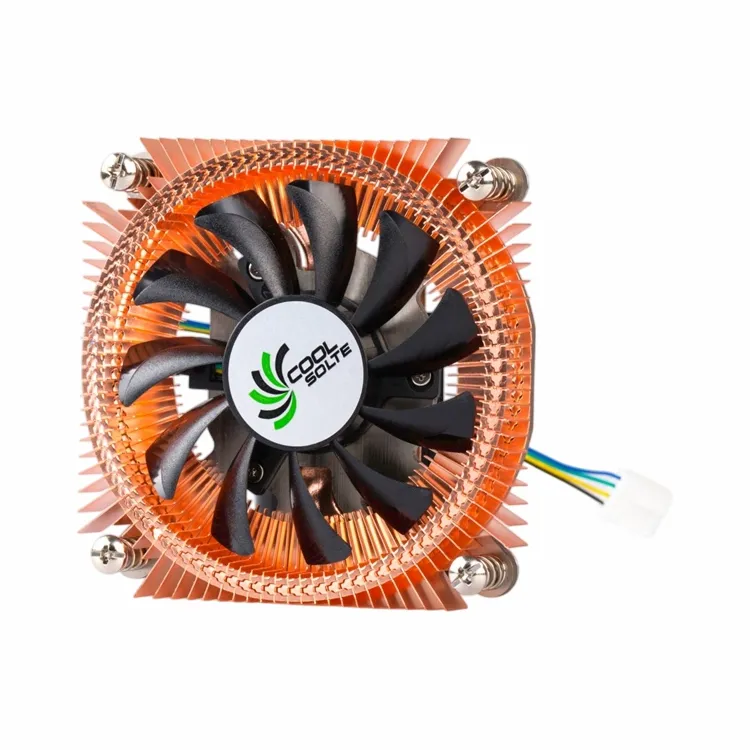

Check the mounting brackets or screws that hold the heat sink in place. Make sure they're tightened properly. If you find that a screw is loose, use a screwdriver to tighten it. But be careful not to overtighten, as this can damage the CPU or the motherboard.
5. Upgrade Your Heat Sink
If you've tried all the above steps and still have heat sink problems, it might be time to upgrade your heat sink. There are many high - performance heat sinks available on the market. For example, our Black Anodized Aluminum Heat Sink for CPU is made of high - quality aluminum, which has excellent heat dissipation properties. And our CPU Heat Sink with Fin for Thermoelectric Cooling is designed for more advanced cooling needs.
Tips for Preventing Heat Sink Problems
Prevention is always better than cure. Here are some tips to keep your mini PC's heat sink in good condition:
- Keep Your Mini PC Clean: Regularly clean the exterior of your mini PC to prevent dust from getting inside. You can also use a dust filter on the air intake vents if your mini PC allows it.
- Place Your Mini PC in a Well - Ventilated Area: Don't put your mini PC in a closed cabinet or under a stack of papers. Make sure there's enough space around it for proper airflow.
- Use Temperature Monitoring Software: Keep an eye on your CPU temperatures regularly. This way, you can catch any potential heat sink problems early.
Conclusion
Troubleshooting a mini PC CPU heat sink problem might seem daunting at first, but with a little knowledge and some basic tools, you can often fix the issue yourself. By following the steps outlined above, you can ensure that your mini PC runs smoothly and stays cool.
If you're still having trouble or are interested in upgrading your heat sink, we're here to help. As a leading mini PC CPU heat sink supplier, we offer a wide range of high - quality heat sinks to meet your needs. Whether you're a casual user or a power user, we have the right heat sink for you. Contact us for more information and let's discuss how we can improve the cooling performance of your mini PC.
References
- "Computer Hardware: A Beginner's Guide" by Andrew Tanenbaum.
- Various online tech forums and communities where users share their experiences with mini PC heat sink problems.