

Hey there! If you're into mini PCs, you know how crucial it is to keep that CPU cool. A compatible CPU heat sink is the key to preventing overheating and ensuring your mini PC runs smoothly. As a mini PC CPU heat sink supplier, I've seen it all, and I'm here to share some tips on how to check if a heat sink is compatible with your motherboard.
Understanding the Basics
First things first, let's talk about what makes a heat sink compatible with a motherboard. The main factors you need to consider are the socket type, size, and power requirements.
Socket Type
The socket type is like the lock and key of the motherboard - heat sink relationship. Each motherboard has a specific socket where the CPU fits, and the heat sink needs to match that socket type. Common socket types for mini PCs include LGA1151, AM4, and BGA1364. You can usually find the socket type of your motherboard in the user manual or by checking the manufacturer's website.
For example, if your motherboard has an LGA1151 socket, you need a heat sink designed for that socket. Using an incompatible socket type can lead to poor contact between the heat sink and the CPU, which means inefficient heat transfer and potential overheating.
Size
Size matters when it comes to heat sinks. You need to make sure the heat sink fits within the available space on your motherboard. Mini PCs are, well, mini, so space can be limited. Measure the area around the CPU socket on your motherboard to get an idea of how much room you have for a heat sink.
Some heat sinks are taller or wider than others, and you need to ensure there's enough clearance for other components like RAM modules and PCI - Express cards. A heat sink that's too big can block other components, making it impossible to install or causing damage.
Power Requirements
Most mini PC heat sinks come with a fan, and these fans require power. You need to check if your motherboard has the necessary power connectors to supply power to the heat sink fan. The most common power connectors for heat sink fans are the 3 - pin and 4 - pin connectors.
A 3 - pin connector provides basic power and speed control, while a 4 - pin connector allows for more precise speed control, which can be useful for adjusting the fan speed based on the CPU temperature. Check your motherboard's manual to see which type of connector it supports.
Checking Compatibility in Practice
Now that you understand the basic factors, let's talk about how to actually check if a heat sink is compatible with your motherboard.
Research the Heat Sink
Before you buy a heat sink, do some research on it. Check the product description on the manufacturer's website or on online retailers. They usually list the compatible socket types, dimensions, and power requirements of the heat sink.
For instance, if you're looking at the CPU Cooling Fan with Heatsink, make sure to read the details carefully. It should clearly state which socket types it supports and its overall size.
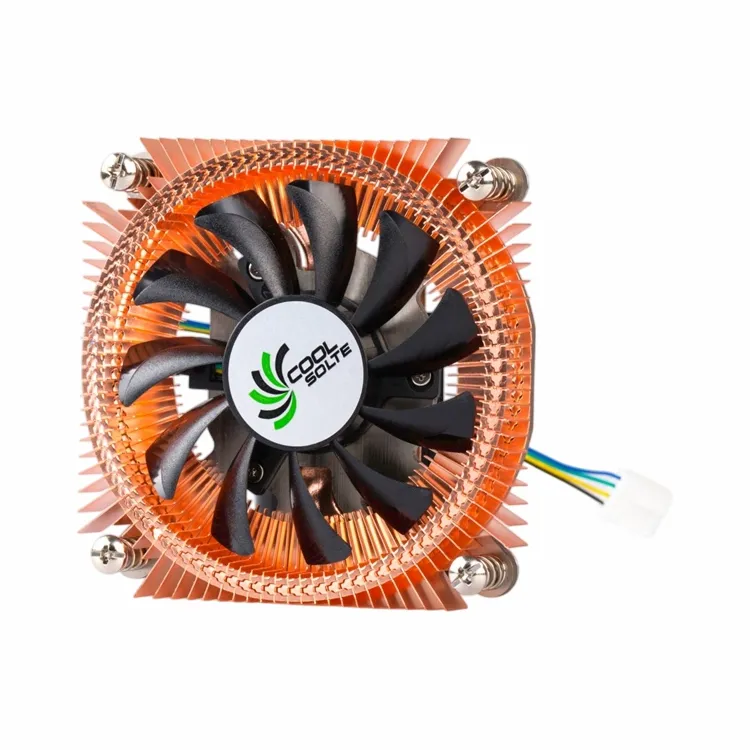

Compare with Your Motherboard Specs
Once you have the heat sink's specs, compare them with your motherboard's specifications. Write down the socket type, available space, and power connectors of your motherboard, and then match them against the heat sink's details.
If the heat sink's socket type matches your motherboard's socket type, it's a good start. Then, check if the size of the heat sink fits within the available space on your motherboard. And finally, make sure the power connectors on the heat sink are compatible with what your motherboard can provide.
Look for User Reviews
User reviews can be a great source of information. Check online forums and review websites to see if other people have used the heat sink with your motherboard. They can share their experiences, including any compatibility issues they may have encountered.
If you see a lot of reviews saying that the heat sink doesn't fit properly or has power - related problems with your motherboard model, it's a red flag. On the other hand, positive reviews from users with the same motherboard can give you more confidence in your purchase.
Our Product Range
As a mini PC CPU heat sink supplier, we offer a wide range of heat sinks to meet different motherboard requirements.
Our Mini Computer Heat Sink for CPU Devices is designed specifically for mini PCs. It comes in various sizes and is compatible with multiple socket types. Whether you have a small - form - factor motherboard or a more standard one, we have a heat sink that can fit.
Another great option is our CPU Heat Sink with Fin for Thermoelectric Cooling. This heat sink uses advanced thermoelectric cooling technology to provide efficient heat dissipation. It's also designed to be compatible with a variety of motherboards, ensuring that you can keep your CPU cool no matter what motherboard you have.
Why Choose Our Heat Sinks
- Quality Assurance: We use high - quality materials in our heat sinks to ensure durability and efficient heat transfer. Our products undergo strict quality control tests to meet industry standards.
- Wide Compatibility: Our heat sinks are designed to be compatible with a wide range of motherboard socket types and sizes. This means you can easily find a heat sink that fits your specific motherboard.
- Expert Support: If you're not sure which heat sink is right for your motherboard, our team of experts is here to help. We can provide you with detailed information and guidance to make sure you make the right choice.
Contact Us for Purchasing
If you're interested in our mini PC CPU heat sinks and want to discuss your specific requirements, we'd love to hear from you. Whether you're a small - scale user or a large - scale distributor, we can offer you competitive prices and excellent service.
Contact us today to start the purchasing process. We'll work with you to find the perfect heat sink for your motherboard and ensure a smooth buying experience.
References
- Computer Hardware Manuals: User manuals of motherboards and heat sinks provide detailed specifications and compatibility information.
- Online Tech Forums: Websites like Tom's Hardware and Reddit's r/buildapc offer valuable insights from real - world users about heat sink and motherboard compatibility.