

Hey there! As a supplier of mini PC CPU heat sinks, I've seen firsthand how crucial fan blade design is when it comes to airflow. In this blog, I'm gonna break down how different fan blade designs can impact the airflow in a mini PC CPU heat sink.
Let's start with the basics. Airflow is super important for a mini PC CPU heat sink. The main job of a heat sink is to transfer the heat generated by the CPU to the surrounding air. And for that to happen efficiently, there needs to be a good flow of air over the heat sink. If the airflow is poor, the heat can't be dissipated effectively, which can lead to the CPU overheating and potentially causing performance issues or even damage.
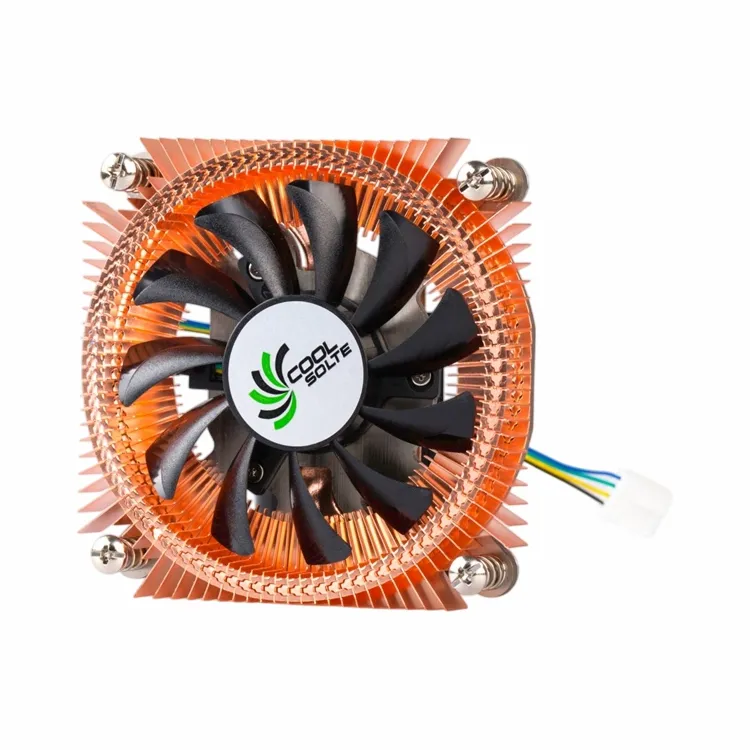

One of the key factors in fan blade design that affects airflow is the blade shape. There are several common blade shapes out there, and each has its own pros and cons when it comes to moving air.
First up, we've got the straight blade design. Straight blades are pretty simple in shape. They're just flat blades that stick out from the center of the fan. These blades are easy to manufacture, which makes them cost - effective. But when it comes to airflow, they're not the most efficient. Straight blades tend to create a lot of turbulence as they spin. Turbulence is basically chaotic air movement, and it can reduce the overall efficiency of the airflow. The air doesn't move in a smooth, straight path over the heat sink, which means it's not as good at carrying away the heat.
On the other hand, we have the curved blade design. Curved blades are shaped like little wings. They're designed to work like an airplane wing, creating lift and moving air more smoothly. When the fan spins, the curved blades can direct the air in a more focused and efficient way. This reduces turbulence and increases the amount of air that can be moved over the heat sink. As a result, curved blade fans are generally better at cooling the CPU because they can provide a more consistent and powerful airflow.
Another important aspect of fan blade design is the blade pitch. The blade pitch refers to the angle at which the blades are set relative to the plane of the fan. A high - pitch blade is set at a steeper angle, while a low - pitch blade has a more shallow angle.
High - pitch blades are great for moving a large volume of air quickly. They can generate a strong airflow, which is really useful for cooling high - performance CPUs that generate a lot of heat. However, high - pitch blades also require more power to spin. This means they can draw more electricity and may produce more noise. If you're using a mini PC in a quiet environment, the extra noise from a high - pitch blade fan might be a problem.
Low - pitch blades, on the other hand, use less power and are generally quieter. They're a good choice for mini PCs that don't require a huge amount of cooling. But they can't move as much air as high - pitch blades, so they might not be suitable for CPUs that run hot.
The number of blades on a fan also plays a role in airflow. Fans can have anywhere from 2 to 12 or more blades. Generally, fans with more blades can move more air because there are more surfaces pushing the air. However, having too many blades can also create more drag. Drag is the resistance that the blades encounter as they spin through the air. If there's too much drag, the fan has to work harder to spin, which can reduce its efficiency. So, there's a sweet spot when it comes to the number of blades. For most mini PC CPU heat sinks, fans with 5 to 7 blades tend to offer a good balance between airflow and efficiency.
Now, let's talk about how these different fan blade designs can affect the overall performance of a mini PC CPU heat sink. A well - designed fan blade can significantly improve the cooling efficiency of the heat sink. For example, if you're using a heat sink with a straight blade fan that's creating a lot of turbulence, you might notice that your CPU temperatures are higher than they should be. Upgrading to a heat sink with a curved blade fan could potentially lower those temperatures.
As a supplier, I offer a variety of mini PC CPU heat sinks with different fan blade designs to meet the needs of different customers. You can check out our Mini Computer Heat Sink for CPU Devices. This heat sink is designed to provide efficient cooling for a wide range of mini PC CPUs. It features a carefully engineered fan blade design that maximizes airflow while keeping noise levels down.
If you're looking for a more powerful cooling solution, our CPU Cooling Fan with Heatsink might be the right choice for you. This product uses a high - pitch blade fan to move a large volume of air quickly, making it ideal for high - performance mini PCs.
And for those who need a heat sink for thermoelectric cooling, we have the CPU Heat Sink with Fin for Thermoelectric Cooling. The fan blade design on this heat sink is optimized to work in conjunction with thermoelectric cooling elements, ensuring efficient heat transfer.
In conclusion, the fan blade design of a mini PC CPU heat sink has a huge impact on airflow. By choosing the right blade shape, pitch, and number of blades, you can improve the cooling efficiency of your mini PC and keep your CPU running at optimal temperatures. If you're in the market for a mini PC CPU heat sink, I'd love to talk to you about our products. Whether you're a small business looking to outfit your office computers or an individual building your own mini PC, we've got the right heat sink for you. Reach out to us to start a conversation about your specific needs and how we can help you find the perfect cooling solution.
References
- Cooling Technology Handbook, McGraw - Hill
- Thermal Management of Electronic Systems, Wiley