

Yo, what's up tech enthusiasts! I'm stoked to chat with you today about a hot topic in the PC world: Can a low profile AIO cooler overclock a CPU? As a supplier of low profile AIO coolers, I've seen firsthand how these little beasts can make a big difference in your rig's performance. So, let's dive in and explore this question together.
First off, let's talk about what overclocking is. In a nutshell, overclocking is the process of pushing your CPU to run at a higher clock speed than its stock settings. This can result in significant performance gains, especially in tasks that are CPU-intensive, like gaming, video editing, and 3D rendering. However, overclocking also generates more heat, which can lead to thermal throttling and instability if your cooling solution isn't up to the task.
That's where low profile AIO coolers come in. These coolers are designed to provide efficient cooling in a compact form factor, making them ideal for small form factor (SFF) builds and cases with limited space. Unlike traditional air coolers, which rely on a large heatsink and fan to dissipate heat, AIO coolers use a liquid cooling loop to transfer heat away from the CPU and into a radiator, where it can be dissipated by a fan or fans.
So, can a low profile AIO cooler overclock a CPU? The short answer is yes, but it depends on a few factors. Let's take a closer look at these factors and how they can impact your overclocking performance.
CPU Power Consumption
The first factor to consider is your CPU's power consumption. Different CPUs have different power requirements, and some are more power-hungry than others. For example, high-end desktop CPUs like the Intel Core i9-13900KS and AMD Ryzen 9 7950X3D can consume upwards of 200 watts or more under heavy load, while mid-range CPUs like the Intel Core i5-13600K and AMD Ryzen 5 7600X typically consume around 100-150 watts.
If you're planning to overclock a high-power CPU, you'll need a cooler that can handle the extra heat. While low profile AIO coolers are generally more efficient than air coolers, they may not be able to dissipate enough heat to keep a high-power CPU cool under heavy overclocking. In this case, you may need to consider a larger AIO cooler or a custom liquid cooling loop.
Cooling Capacity
The cooling capacity of a low profile AIO cooler is another important factor to consider. Cooling capacity is measured in watts and refers to the amount of heat that a cooler can dissipate. The higher the cooling capacity, the better the cooler will be at keeping your CPU cool under heavy load.
When choosing a low profile AIO cooler, it's important to choose one with a cooling capacity that is appropriate for your CPU's power consumption. As a general rule of thumb, you should choose a cooler with a cooling capacity that is at least 1.5 times your CPU's TDP (thermal design power). For example, if your CPU has a TDP of 100 watts, you should choose a cooler with a cooling capacity of at least 150 watts.
Fan Speed and Noise Level
The fan speed and noise level of a low profile AIO cooler are also important factors to consider. Fan speed is measured in RPM (revolutions per minute) and refers to how fast the fan spins. The higher the fan speed, the more air the fan will move, which can result in better cooling performance. However, higher fan speeds also tend to produce more noise.

When choosing a low profile AIO cooler, it's important to choose one with a fan speed that is appropriate for your needs. If you're looking for maximum cooling performance, you may want to choose a cooler with a high fan speed. However, if you're looking for a quieter system, you may want to choose a cooler with a lower fan speed.
Radiator Size
The radiator size of a low profile AIO cooler is another important factor to consider. Radiator size is measured in millimeters and refers to the length of the radiator. The larger the radiator, the more surface area there is for heat to dissipate, which can result in better cooling performance.
When choosing a low profile AIO cooler, it's important to choose one with a radiator size that is appropriate for your case. Most low profile AIO coolers come with either a 120mm or 240mm radiator. If you have a small form factor case, you may need to choose a cooler with a 120mm radiator. However, if you have a larger case, you may be able to choose a cooler with a 240mm radiator for better cooling performance.
Real-World Performance
So, how do low profile AIO coolers perform in the real world? Well, the answer depends on a few factors, including the CPU you're using, the cooling capacity of the cooler, and the overclocking settings you're using.
In general, low profile AIO coolers can provide sufficient cooling for mid-range CPUs under moderate overclocking. For example, if you're using a mid-range CPU like the Intel Core i5-13600K or AMD Ryzen 5 7600X and you're overclocking it by a few hundred megahertz, a low profile AIO cooler with a 120mm or 240mm radiator should be able to keep it cool under heavy load.
However, if you're using a high-end CPU like the Intel Core i9-13900KS or AMD Ryzen 9 7950X3D and you're overclocking it to its maximum potential, you may need a larger AIO cooler or a custom liquid cooling loop to keep it cool.
Our Low Profile AIO Coolers
As a supplier of low profile AIO coolers, we offer a range of products that are designed to provide efficient cooling in a compact form factor. Our coolers are compatible with a wide range of CPUs and come with a variety of features, including high-performance fans, large radiators, and easy installation.
One of our most popular products is the [Product Name], which features a [X]mm radiator and [X] high-performance fans. This cooler is designed to provide excellent cooling performance in a compact form factor, making it ideal for small form factor builds and cases with limited space.
Another popular product is the [Product Name], which features a [X]mm radiator and [X] high-performance fans. This cooler is designed to provide even better cooling performance than the [Product Name], making it ideal for mid-range and high-end CPUs.
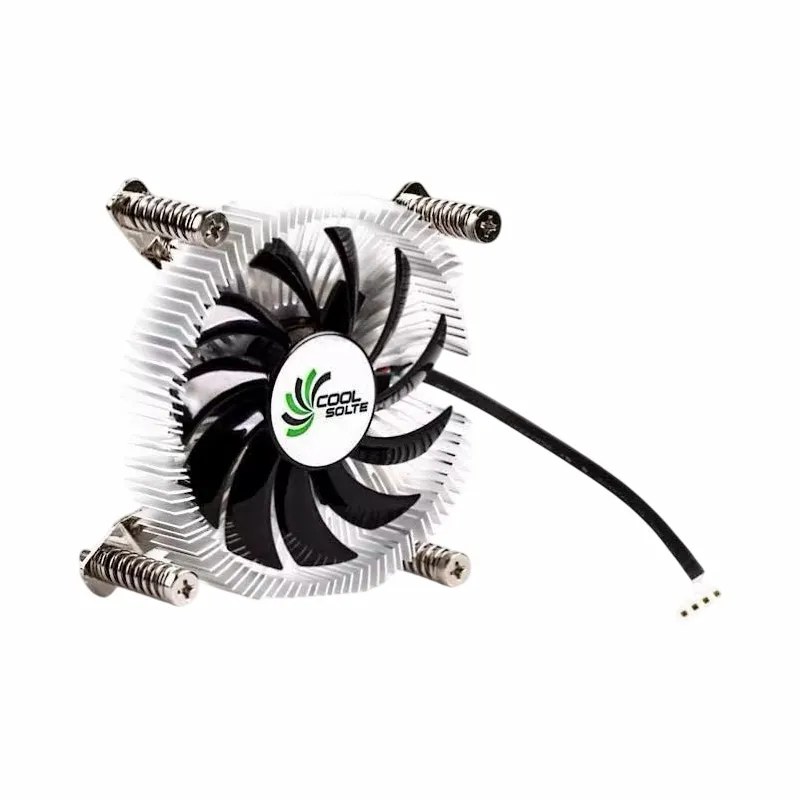
If you're interested in learning more about our low profile AIO coolers, check out our Computer Cooler Fan with Alloy Aluminium CPU Heat Sink, Air Cooler Fans Cooling Heat Sink for CPU, and Copper CPU Heatpipe Radiator for AMD Intel.
Conclusion
So, can a low profile AIO cooler overclock a CPU? The answer is yes, but it depends on a few factors, including the CPU you're using, the cooling capacity of the cooler, and the overclocking settings you're using. In general, low profile AIO coolers can provide sufficient cooling for mid-range CPUs under moderate overclocking, but if you're using a high-end CPU and you're overclocking it to its maximum potential, you may need a larger AIO cooler or a custom liquid cooling loop.
If you're looking for a low profile AIO cooler that can provide efficient cooling in a compact form factor, we encourage you to check out our products. We offer a range of coolers that are designed to meet the needs of different users, from casual gamers to professional overclockers.
If you have any questions or if you're interested in purchasing one of our low profile AIO coolers, please don't hesitate to contact us. We'd be happy to help you find the right cooler for your needs and to answer any questions you may have.

References
- Tom's Hardware. (2023). The Best CPU Coolers. Retrieved from [URL]
- PCMag. (2023). Best CPU Coolers for 2023. Retrieved from [URL]
- TechRadar. (2023). Best CPU Coolers 2023. Retrieved from [URL]