

Can a budget CPU cooler be used with a liquid - cooled GPU?
In the world of PC building and customization, enthusiasts are constantly on the lookout for ways to optimize their systems while keeping costs in check. One common question that arises is whether a budget CPU cooler can be used in conjunction with a liquid - cooled GPU. As a supplier of the Best Budget CPU Coolers, I'll delve into this topic, exploring the technical aspects, potential benefits, and limitations of such a combination.
Understanding Budget CPU Coolers and Liquid - Cooled GPUs
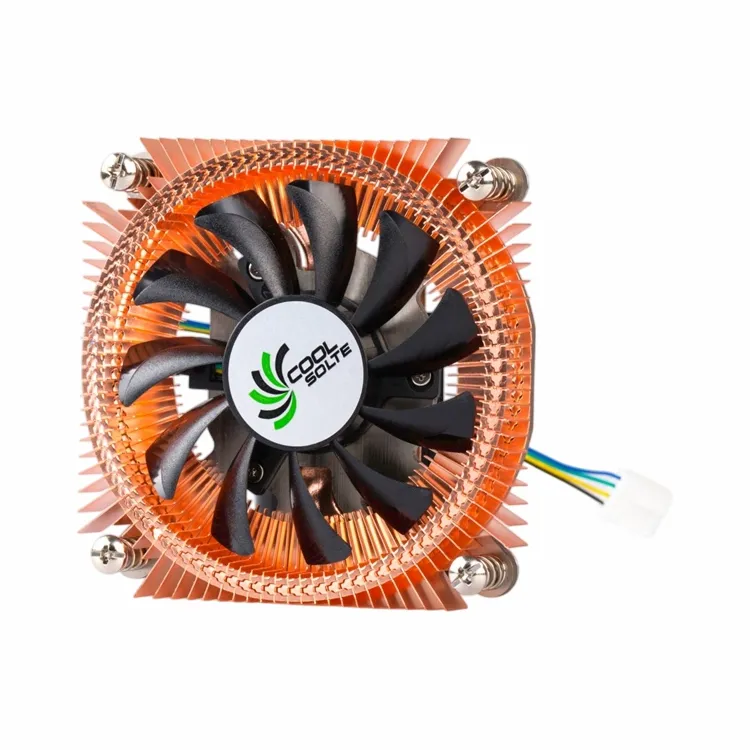
Budget CPU coolers are designed to provide adequate cooling for central processing units (CPUs) at an affordable price. These coolers typically come in two main types: air coolers and all - in - one (AIO) liquid coolers. Air coolers use a heatsink and a fan to dissipate heat from the CPU. They are simple, reliable, and often very effective for most mainstream CPUs. For example, our CPU Cooling Fan with Heatsink is a popular choice among budget - conscious users. It offers a good balance between cooling performance and cost, with a well - designed heatsink that efficiently transfers heat away from the CPU and a fan that blows the hot air out of the case.
On the other hand, liquid - cooled GPUs use a closed - loop liquid cooling system to keep the graphics processing unit (GPU) at optimal temperatures. Liquid cooling is generally more efficient than air cooling, especially for high - performance GPUs that generate a significant amount of heat. The liquid absorbs the heat from the GPU and transfers it to a radiator, where it is dissipated by fans.
Compatibility Considerations
The first thing to consider when thinking about using a budget CPU cooler with a liquid - cooled GPU is physical compatibility. In most cases, the CPU cooler and the GPU are installed in different locations within the PC case. The CPU cooler is mounted on the CPU socket on the motherboard, while the GPU is installed in a PCIe slot. As long as there is enough space in the case to accommodate both components without any interference, physical compatibility should not be an issue.
However, it's also important to consider the power requirements. Budget CPU coolers usually have relatively low power consumption, which is beneficial for overall system power efficiency. A liquid - cooled GPU, on the other hand, may draw a significant amount of power. But since they are separate components, their power consumption is not directly related. As long as your power supply unit (PSU) can handle the combined power requirements of the CPU, GPU, and other components in your system, you should be fine.
Cooling Performance
One of the main concerns when using a budget CPU cooler with a liquid - cooled GPU is whether the CPU cooler can effectively cool the CPU under heavy loads. While liquid - cooled GPUs are designed to handle the high heat output of modern GPUs, budget CPU coolers may have limitations when it comes to high - end CPUs.
For example, if you have a high - end overclocked CPU, a budget air cooler may struggle to keep the temperatures in check during intensive tasks such as gaming, video editing, or 3D rendering. In such cases, you may want to consider upgrading to a more powerful CPU cooler. Our Mini Computer Heat Sink for CPU Devices is a step up from basic budget coolers, offering better cooling performance for more demanding CPUs.
On the GPU side, since it has its own dedicated liquid cooling system, the performance of the CPU cooler should not directly affect the GPU's cooling. However, a well - cooled CPU can contribute to overall system stability, which in turn can have a positive impact on the GPU's performance. If the CPU is running hot, it may throttle, causing the system to slow down and potentially affecting the GPU's ability to perform at its best.
Cost - Benefit Analysis
One of the main advantages of using a budget CPU cooler with a liquid - cooled GPU is cost savings. Liquid - cooled GPUs are often more expensive than their air - cooled counterparts, and investing in a high - end CPU cooler can also add a significant amount to the overall cost of your PC build. By choosing a budget CPU cooler, you can save money without sacrificing too much in terms of performance, especially if you have a mid - range CPU.
For example, if you are building a gaming PC on a budget and you already have a liquid - cooled GPU, a budget CPU cooler can be a great option. You can allocate more of your budget towards other components such as more RAM or a faster SSD, which can also improve the overall gaming experience.

Potential Limitations
While there are many benefits to using a budget CPU cooler with a liquid - cooled GPU, there are also some potential limitations. As mentioned earlier, budget CPU coolers may not be suitable for high - end overclocked CPUs. If you plan to overclock your CPU in the future, you may need to upgrade your CPU cooler.
Another limitation is noise. Some budget CPU coolers may be noisier than more expensive models, especially when the fan has to spin at high speeds to maintain adequate cooling. This can be a nuisance, especially if you are using your PC in a quiet environment. However, there are ways to mitigate this issue, such as adjusting the fan speed settings or using a fan controller.
Conclusion
In conclusion, using a budget CPU cooler with a liquid - cooled GPU is generally a viable option, especially for budget - conscious PC builders. As long as you consider the compatibility, cooling performance, and potential limitations, you can achieve a good balance between cost and performance. Our range of budget CPU coolers, such as the CPU Heat Sink with Fin for Thermoelectric Cooling, offers reliable cooling solutions that can work well with liquid - cooled GPUs.
If you're interested in learning more about our budget CPU coolers or have any questions regarding their compatibility with liquid - cooled GPUs, we encourage you to reach out to us for a procurement discussion. We're here to help you make the best choices for your PC build.
References
- "PC Cooling Handbook" by Tom's Hardware
- "Graphics Card Cooling Technologies" by AnandTech