

Can a budget CPU cooler be used for a 24/7 running PC?
As a supplier of the Best Budget CPU Coolers, I often encounter questions from customers regarding the suitability of budget CPU coolers for PCs that run around the clock. This is a crucial query, especially for those who rely on their computers for continuous operations, such as server - grade tasks, long - term gaming sessions, or 24/7 monitoring systems.
The Basics of CPU Cooling
Before delving into whether a budget CPU cooler can handle 24/7 operation, it's essential to understand how a CPU cooler works. A CPU generates heat during operation due to the electrical currents flowing through its transistors. If this heat is not dissipated properly, the CPU will overheat, which can lead to performance degradation, system instability, and even permanent damage.
A CPU cooler typically consists of a heat sink and a fan. The heat sink is designed to absorb the heat from the CPU and spread it over a larger surface area. The fan then blows air over the heat sink, carrying the heat away from the system. High - end coolers may feature more advanced designs, such as liquid cooling systems, which offer better heat dissipation capabilities but come at a higher cost.
Advantages of Budget CPU Coolers
Budget CPU coolers have several advantages that make them an attractive option for many users. Firstly, the most obvious benefit is the cost. They are significantly cheaper than high - end coolers, making them accessible to a wider range of customers, including those on a tight budget or for systems where cost - effectiveness is a priority.
Secondly, budget CPU coolers are generally easy to install. They usually come with straightforward mounting mechanisms that can be easily attached to the CPU socket without the need for specialized tools or extensive technical knowledge. This makes them a great choice for DIY enthusiasts or those who prefer to set up their own systems.
Another advantage is that they are often compact in size. This can be beneficial for small form - factor PCs or cases with limited space. They won't take up too much room inside the case, allowing for better cable management and airflow around other components.
Challenges of Using Budget CPU Coolers for 24/7 Operation
However, using a budget CPU cooler for a PC that runs 24/7 also presents some challenges. One of the main issues is heat dissipation efficiency. Budget coolers may not have the same level of thermal conductivity as high - end models. This means that they may not be able to transfer heat away from the CPU as effectively, especially during long - term, high - load operations.
Over time, continuous operation can cause the components of a budget CPU cooler to wear out more quickly. The fan bearings may start to make noise or fail, and the thermal paste between the CPU and the heat sink may dry out, reducing its ability to transfer heat. This can lead to a gradual increase in CPU temperatures, which can be detrimental to the system's performance and longevity.
Assessing the Suitability
To determine whether a budget CPU cooler can be used for a 24/7 running PC, several factors need to be considered.
CPU Power Consumption
The power consumption of the CPU is a key factor. High - end CPUs with a high TDP (Thermal Design Power) generate more heat and require more efficient cooling solutions. If you have a low - power CPU, such as an entry - level Intel Celeron or AMD Athlon, a budget CPU cooler may be sufficient to keep it cool during continuous operation. However, for a high - end gaming or workstation CPU with a TDP of over 100W, a budget cooler may struggle to maintain optimal temperatures.
Case Airflow
The airflow inside the PC case also plays a crucial role. A well - ventilated case with proper intake and exhaust fans can help the budget CPU cooler perform better. If the case has poor airflow, heat will build up inside the case, making it even more difficult for the cooler to dissipate the heat from the CPU.
Overclocking
Overclocking is the process of increasing the CPU's clock speed beyond its stock settings. This significantly increases the heat output of the CPU. If you plan to overclock your CPU and run it 24/7, a budget CPU cooler is likely not suitable. Overclocked CPUs require high - performance cooling solutions to prevent overheating.
Our Budget CPU Cooler Solutions
At our company, we offer a range of budget CPU coolers that are designed to provide reliable cooling for various applications. For example, our CPU Heat Sink with Fin for Thermoelectric Cooling is a cost - effective option that features a fin - based design for efficient heat dissipation. It is suitable for low - to medium - power CPUs and can handle continuous operation under normal load conditions.
Our Black Anodized Aluminum Heat Sink for CPU is another great choice. The black anodized aluminum construction not only provides good thermal conductivity but also adds a sleek look to the system. It is easy to install and can offer stable cooling performance for long - term use.
If you need a cooler with a fan, our CPU Cooling Fan with Heatsink is a reliable option. The combination of a heat sink and a fan ensures effective heat dissipation, and it is priced affordably for budget - conscious customers.
Tips for Using Budget CPU Coolers in 24/7 Operation
If you decide to use a budget CPU cooler for your 24/7 running PC, there are some tips that can help you ensure its longevity and performance.
- Regular Maintenance: Clean the cooler regularly to remove dust and debris. Dust can accumulate on the heat sink and fan blades, reducing their ability to dissipate heat. Use compressed air to blow out the dust every few months.
- Monitor Temperatures: Keep an eye on the CPU temperatures using software tools. If you notice a significant increase in temperatures, it may be a sign that the cooler is not performing well, and you may need to take action, such as replacing the thermal paste or the fan.
- Optimize Case Airflow: Make sure your PC case has proper airflow. Add additional fans if necessary to improve the overall ventilation inside the case.
Conclusion
In conclusion, a budget CPU cooler can be used for a 24/7 running PC, but it depends on several factors, such as the CPU's power consumption, case airflow, and whether the CPU is overclocked. While budget coolers offer cost - effectiveness, ease of installation, and compact size, they may face challenges in terms of heat dissipation efficiency and long - term durability.

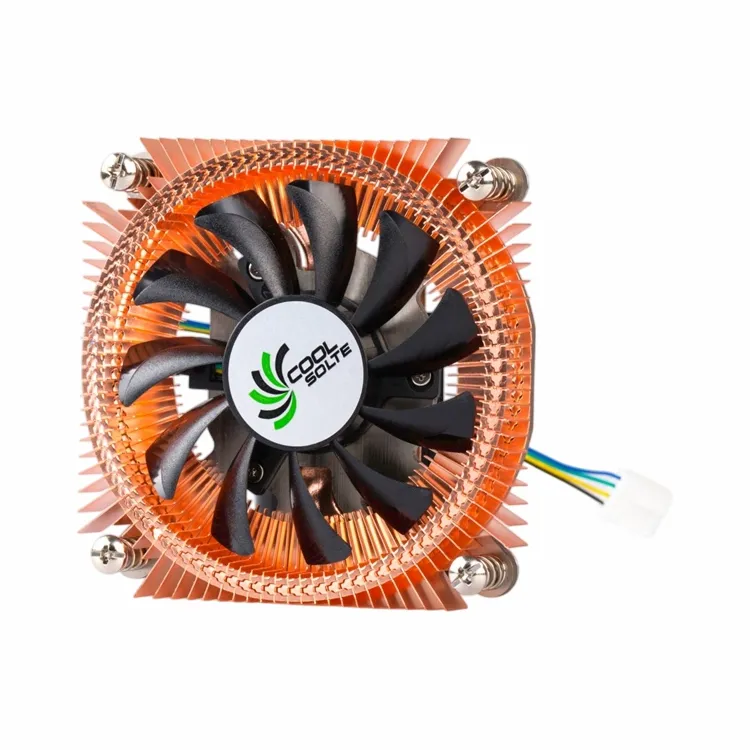
At our company, we are committed to providing high - quality budget CPU coolers that can meet the needs of different users. If you are interested in our products or have any questions about using budget CPU coolers for your 24/7 running PC, we encourage you to contact us for procurement and further discussion. We are here to help you find the best cooling solution for your system.
References
- "Computer Hardware: A Beginner's Guide" by Andrew Tanenbaum
- Thermal Management in Electronic Systems by David V. Boger
- Intel and AMD CPU product documentation for thermal specifications